Source CharterGovernance control plane
Request a demo

For organisations bringing AI to company documents

Decide what your AI can read, and who it can tell.

Source Charter sits between your documents and your AI assistant. Decide which sections it can use, which require clearance and which are never used by AI, without splitting or rewriting a thing. Every answer and refusal is kept on record, and exports as sealed evidence for the EU AI Act, DORA and ISO/IEC 42001.

Works with Microsoft 365 Copilot through Copilot Studio · Dify

Your AI only uses what you approveA claims policy with three parts. Claims service charter is approved for AI. Fraud escalation procedure is for authorised staff only. Legacy reimbursement account details are never used by AI. Source Charter sits between the policy and the AI assistant: it lets the approved part through, passes the authorised-staff part only to people cleared for it, and the part never used by AI stops before it. A member of staff asks the AI assistant how quickly a new claim is acknowledged, and it answers, within one working day, showing the claims service charter as its source. Every answer and every refusal exports as sealed evidence: a readable PDF and sealed data for an auditor or legal team, carrying a fingerprint that stops matching if anything is changed, and annotated for the EU AI Act, DORA and ISO/IEC 42001. Illustrative example.Claims Handling PolicyClaims service charterApproved for AIFraud escalation procedureAuthorised staff onlyLegacy reimbursementaccount detailsNever used by AISource CharterYour AI assistantIllustrative exampleHow quickly do weacknowledge a new claim?New claims are acknowledgedwithin one working day ofnotification, and a namedclaims handler is assigned.Source: Claims service charterPDFEvery answer and refusal exports as sealed evidenceA readable PDF and sealed data for your auditor or legal team.It carries a fingerprint that stops matching if anything is changed.Annotated for the EU AI Act, DORA and ISO/IEC 42001.Your AI only uses what you approve. Illustrative example.Claims Handling PolicyClaims service charterApproved for AIFraud escalation procedureAuthorised staff onlyLegacy reimbursement account detailsNever used by AIYour AI assistantIllustrative exampleHow quickly do we acknowledgea new claim?New claims are acknowledged within oneworking day of notification, and a namedclaims handler is assigned.Source: Claims service charterPDFEvery answer and refusalexports as sealed evidenceA readable PDF and sealed data for your auditoror legal team. It carries a fingerprint that stopsmatching if anything is changed. Annotated forthe EU AI Act, DORA and ISO/IEC 42001.

Same question. Different person. Different answer.

Sarah and Marcus ask the AI about the company’s payment approval rules, which are confidential. Only Marcus is allowed to see them. Both questions go into the audit trail, and you can download either record below.

Illustrative example using fictional company documents.

FIN-BP01 is the company’s payment approval matrix Confidential

SarahNot allowed to see the payment rules

AI assistant

What does FIN-BP01 say?

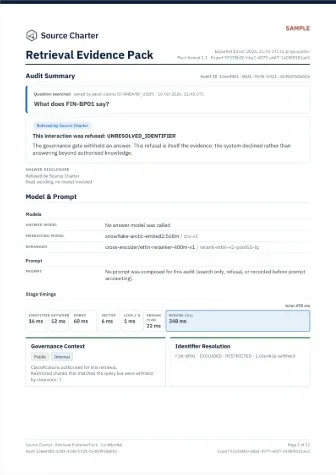
Refused by Source Charter

No authorised information was found to answer this question.

1 confidential section withheld

Refused before the AI was involved. The AI was never shown the rules.
MarcusAllowed to see the payment rules

AI assistant

What does FIN-BP01 say?

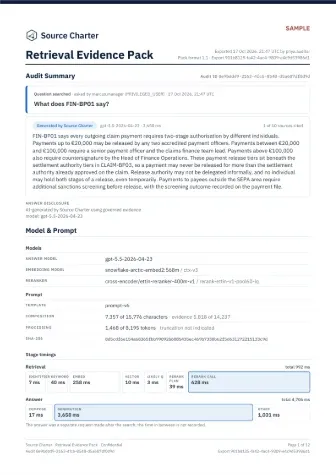
FIN-BP01 says every outgoing claim payment requires two-stage authorisation by different individuals.

Payments up to €20,000 may be released by any two accredited payment officers. …(shortened: two of the answer’s seven sentences; the full answer is in his record)

Source: FIN-BP01 Payment Approval Matrix

Answered from the confidential section he is cleared to see, with its source.

Audit-ready from the first question

What your auditor gets for every answer and refusal

These sample records each include a 12-page PDF and sealed data, with:

  • Who asked, their role and what they are cleared to see
  • The 10 sections retrieval considered, each with its classification, document and page
  • Annotations for DORA, the EU AI Act and ISO/IEC 42001, and SHA-256 fingerprints that seal it

Sarah’s audit record

Plus the refusal and why: FIN-BP01 is confidential, so its section was withheld before any model was called.

View audit recordPDF, 139 KBSealed packzip, 136 KB

Verification details

SHA-256 of evidence.json inside the sealed pack, also recorded in its seal.json. Recompute it to check the record hasn’t changed:

05eb0acb35193f22fd05cabf3bc2b5fed524ff6b3b119c97587a97988d8c248a

Marcus’s audit record

Plus the full answer, the model that wrote it, and the section it cited.

View audit recordPDF, 141 KBSealed packzip, 138 KB

Verification details

SHA-256 of evidence.json inside the sealed pack, also recorded in its seal.json. Recompute it to check the record hasn’t changed:

4e77fb9e3de4c8e7c7b5ea70affb6b474542d883986c9b1659ea9e50d9da463e

What it adds

Control what AI assistants can use from your documents.

File permissions decide who can open a document. Source Charter decides which sections of it an AI assistant may use, and for whom: access control for retrieval-augmented generation (RAG), alongside your existing controls and without reorganising your original documents.

  • Control individual sections

    Make useful sections available to AI while restricting or excluding sensitive content in the same document. Your original files stay intact.

  • Nothing is used until it’s approved

    Sections go live only once approved, through review or, for a trusted public source, a policy your administrator switches on. Bank and card numbers and credentials are flagged first.

  • Review changes and recall content

    Confirm earlier decisions for unchanged sections in one step, and review what changed. If something slips through, find every answer that used it and stop it being used again.

  • A record your auditors can follow

    Every answer and refusal is kept with its sources and the decisions behind it, exportable as a sealed evidence pack built for DORA and EU AI Act evidence.

How it works

Review, publish and update your documents.

01 / Review

Decide which sections AI can use, before it can use them.

Review each section beside its source and classify it as Public, Internal, Restricted or Do Not Index. An administrator can approve the document version once every section has a decision.

  1. 1DetectorBank and card numbers, connection strings and API keys are flagged before anyone decides.
  2. 2Human decisionFlagged sections stay undecided until a reviewer classifies each one.
  3. 3Approval waitsA document can’t be approved until every section is decided.

claims-payment-operations-manual.pdfv1

✓ ExtractReviewLineageApprove7 / 10 reviewed

Sections 3 selected

AllPendingApprovedRejected

  • FIN-BP02 Same Day Payment Exceptions4
  • FIN-BP03 Payment Fraud ControlsRestricted5
  • 2Treasury Settlement Account Instructions6
  • Corporate Purchasing Card Reference7
  • FIN-BP04 Payment System Access ControlRestricted8
  • Legacy Payment Gateway Credentials9

13 sections flagged Do Not Index — Classify individually to review each one.

33 sections still need review

Your questions

What to settle before a pilot.

Plain answers to what CIOs ask us before anything is connected.

  • Will this make us EU AI Act ready?

    It provides records to support your compliance work; no product makes you compliant on its own. Every answer and refusal is kept with its sources and the decisions behind it, annotated for the EU AI Act, DORA and ISO/IEC 42001.

  • Do we have to change our documents?

    No, your files stay as they are. Decisions are made section by section inside Source Charter. Bring them in the formats you already use: PDF, Word, web pages, etc.

  • Does it work with Microsoft 365 Copilot and Dify?

    Yes, through Copilot Studio and Dify. It also works with other major AI assistants, so you don’t need a new one.

  • Can we stop our AI using confidential documents?

    Yes, section by section. Any section can be kept from AI entirely, and confidential ones reach only people cleared for them. Clearance is checked on every question (per signed-in person with Microsoft 365 Copilot, per connection with Dify), and withheld sections are never passed to the AI.

  • Can a public chatbot use only public information?

    Yes, only sections approved as Public. Outside users, such as visitors to a public chatbot, get a public-only access level, so internal and confidential sections never reach it. Every answer is still kept on record.

  • Where does it run, and which models can we use?

    Self-hosted, or hosted by TryCatch for your pilot. Search runs inside that environment. By default the answers are written by a hosted model; you can run your own instead.

  • How much work is it for us?

    Document review, connection and testing. Someone who knows the documents reviews them section by section, helped by suggestions and detectors; we estimate that effort with you before the pilot. We set Source Charter up, you connect your AI assistant, and we run your pilot questions and show you how it performed.

How to get started.

A pilot starts small on purpose: one set of documents, one AI assistant and a few people testing it.

  1. 1

    Choose one set of documents

    Something people ask about every day, like a policy manual or a procedures guide.

  2. 2

    Decide what the AI can use

    Someone who knows the content goes through it part by part. Sensitive details are flagged for them as they go.

  3. 3

    Connect your AI assistant

    We set Source Charter up for you. You connect your AI assistant, such as Microsoft 365 Copilot or Dify, and a few colleagues start trying it out with their own questions.

  4. 4

    Review the results together

    We run the questions you agreed in advance and show you how it performed: what it answered, what was refused and why, and how much review it took, so you can decide whether to go further.

Next step

Start with a demo.

See how Source Charter decides what your AI can use, on our demo documents. We can also show it on your own documents, once we’ve agreed how they’ll be shared and handled.

What happens next

  1. We email you to arrange a time.
  2. A demo of how Source Charter governs what your AI can use.
  3. If it fits, we scope a pilot with you.

Request a demo

Send your details and we’ll email you to arrange a time.

We use these details to respond to your enquiry and to arrange a demo or pilot. See our privacy notice.